herdr-aws-freetier-bar
A Herdr plugin that keeps AWS spend and per-service Free Tier usage in a terminal pane. The first version cost me money to run, because the API I was polling bills a cent per call.
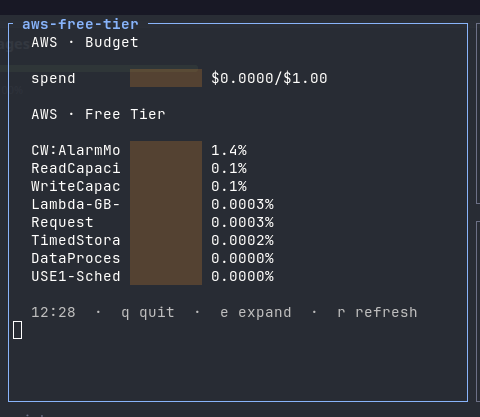
I was avoiding AWS services because I could not tell what they were costing me. Not the console, which tells you eventually. I mean while working: no way to know I was walking into a charge until the invoice explained it afterwards.
I already had a Herdr plugin showing my remaining Alibaba Cloud credit in a fixed pane, so the obvious move was to do the same for AWS. It was not the same. Alibaba has a prepaid balance that counts down. AWS has a spend ceiling you set yourself, plus per-service monthly quotas that reset. Those are different mental models and the two providers shared almost no code beyond the render helpers, so the AWS provider became its own plugin instead of a second file in the old one.
Dollars are the wrong metric for a free tier
The instinct is to reach for Cost Explorer, since spend is what you are worried about. It is the wrong instrument for the actual question.
Cost Explorer reports dollars. Everything still inside the free tier costs zero dollars, so it reports nothing. You are at 94% of your Lambda quota and the API says $0.00, right up until the month you cross the line and it says something else. The metric only moves after the thing you wanted to prevent has already happened.
aws freetier get-free-tier-usage answers the real question, returning per-service actual usage against the limit. So the pane draws bars that fill as usage approaches the ceiling, which is the inverse of the credit bar it came from: that one drains, this one fills.
The tool justified itself on a table I was not using. DynamoDB with provisioned capacity and auto-scaling consumes free tier with zero queries against it, because capacity multiplied by hours accrues all month whether you read the table or not, and auto-scaling quietly creates eight CloudWatch alarms of its own. Nothing was querying it. The bar moved anyway.
The monitor was the line item
The spend half of the pane used Cost Explorer, and this is the part worth the whole project.
Cost Explorer charges one cent per call, with no free allowance. I knew the number. What I had not connected was my own refresh loop: a pane polling every thirty minutes, plus every manual refresh, plus every restart while developing the thing. My spend went from $0.00 to $1.27 the next day. I had not deployed a single new service. The entire increase was the tool I built to watch for unexpected charges, generating unexpected charges.
The replacement is aws budgets describe-budget, reading the spend AWS has already calculated. The first two budgets per account are free to query, so the polling loop stops billing.
It is a genuine downgrade in freshness and I would rather state that than pretend otherwise. Budgets recalculates about three times a day, every eight to twelve hours, so the number on screen can be most of a day stale. Worse, the API returns no field for when it was last calculated, so I cannot even label how old it is. A tripwire that is hours behind is still a tripwire, and a real-time number I have to pay per glance to see is not a number I will keep looking at.
Three smaller things that were wrong
Bash cannot compare the numbers jq produces. A percentage came back as 1.4444443000000002 and arithmetic died on it:
((: 1.4444443000000002: syntax error: invalid arithmetic operator (error token is ".4444443000000002")Bash arithmetic is integer only. The fix is to truncate before comparing and keep the decimals for display, so the bar fills on an integer while the label still reads 1.4%.
Centering on terminal width does not survive a narrow pane. At 49 columns, rows with short suffixes got over-padded and wrapped onto a second line, which shears the bar in half. The other half of that problem is that the block characters drawing the bar render double width, so eight of them occupy about sixteen columns and no width calculation based on character count is right. Fixed indentation, left aligned, is uglier and does not break.
I published my own AWS account ID as a default. When I moved to Budgets, the account id was hardcoded, which is invisible while you are the only user and completely broken the moment someone else installs it: their pane would query my account. It now resolves through sts get-caller-identity once at startup rather than per refresh, so fixing the correctness bug does not add a call to every cycle.
Status
The plugin runs, refreshing every thirty minutes with keys to refresh, expand the rows below 0.01%, and quit. Installable with herdr plugin install CristianPeralta/herdr-aws-freetier-bar.
One caveat I would rather say than hide: the Budgets rewrite and the account id fix are committed locally and not yet pushed, so the published version is still the one that polls Cost Explorer. Anyone installing it today inherits the cent per call. Pushing it is the next thing, ahead of any feature.
The obvious feature is the one the API already hands me and the pane ignores: forecastedUsageAmount, the projected end of month usage. Showing where a quota is heading is more useful than showing where it stands, and it costs nothing extra to fetch.